Week 2
Day 1
SWBAT log into Typing Web accounts and begin two-hand typing with Home Row form
1. Do Now - Type the sentences below into the Comment box EXACTLY as they appear, using two hands. Aim for 100% typing accuracy!
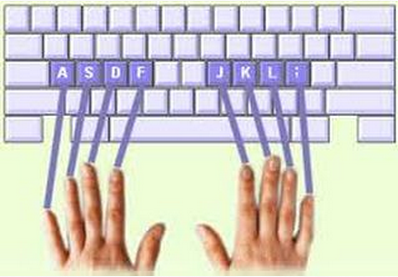
Today we are going to be learning how to type properly. Proper typing uses two hands and requires you to put your hands on certain keys to start. This is called the Home Row position, and we will use it to improve our speed and accuracy.
1. Do Now - Type the sentences below into the Comment box EXACTLY as they appear, using two hands. Aim for 100% typing accuracy!
Today we are going to be learning how to type properly. Proper typing uses two hands and requires you to put your hands on certain keys to start. This is called the Home Row position, and we will use it to improve our speed and accuracy.
2. What is Home Row and how does it help us?
3. TypingWeb training with your login

| typing_web_intro.pptx |
Homework - Complete 30 minutes of TypingWeb training by Wednesday night
TypingWeb tracks your data for Mr. Irvan; we will check progress and look at TOP PERFORMERS in class on Thursday
TypingWeb tracks your data for Mr. Irvan; we will check progress and look at TOP PERFORMERS in class on Thursday
Day 2
SWBAT continue Typing Web training using Home Row hand position
1. Do Now - Socrative Mini-Quiz
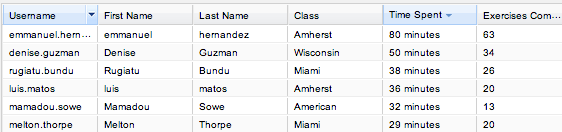
2. First TypingWeb shout outs!
1. Do Now - Socrative Mini-Quiz
- Go to Class Tools at the top of this page, then click on Socrative. Enter 5551234 as the room number and take the mini-quiz.
2. First TypingWeb shout outs!
3. Typing training (12 minutes) -> Typing game (4 minutes) cycle
Homework - Continued from yesterday: Complete 30 minutes of home TypingWeb training by Wednesday night
*You will already have approximately 30-40 minutes from in-class typing -> your total Time Spent should equal 30+30 = 60 minutes minimum
Day 3
SWBAT learn how to properly capitalize letters using the Shift key
SWBAT check their typing data in TypingWeb
SWBAT continue work on personal goals and/or typing training
1. Do Now - Type the blue words perfectly into the comment box below. Use the Shift key to capitalize letters, like in the photo.
The country of Egypt is on the continent of Africa. The country of China is on the continent of Asia. The country of Greece is on the continent of Europe. We live in New York City, which is on the continent of North America.
SWBAT check their typing data in TypingWeb
SWBAT continue work on personal goals and/or typing training
1. Do Now - Type the blue words perfectly into the comment box below. Use the Shift key to capitalize letters, like in the photo.
The country of Egypt is on the continent of Africa. The country of China is on the continent of Asia. The country of Greece is on the continent of Europe. We live in New York City, which is on the continent of North America.
|
|
Hold Shift with your pinkie while pressing the letter you want to capitalize
|
Top 15 in 6th Grade - Most Time Spent Training
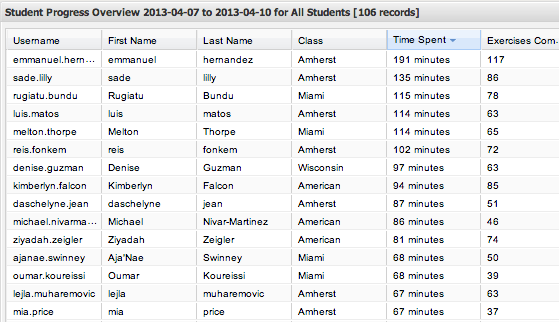
3. How do you check your data in TypingWeb? Let's find out.
4. TypingWeb training OR personal learning goals if you have completed your 60 minutes
Homework:
1) Finish your TypingWeb training tonight (60 minutes minimum)
2) Typing Reflection handout, due Monday
Homework:
1) Finish your TypingWeb training tonight (60 minutes minimum)
2) Typing Reflection handout, due Monday
Day 4 (Monday, April 22)
SWBAT compose a professionally formatted email and send it to a DREAM Team member
1. Do Now - 5 minutes of Typing Web training
(Don't forget to log in so your minutes are counted.)
2. Hook - why email style matters
1. Do Now - 5 minutes of Typing Web training
(Don't forget to log in so your minutes are counted.)
2. Hook - why email style matters
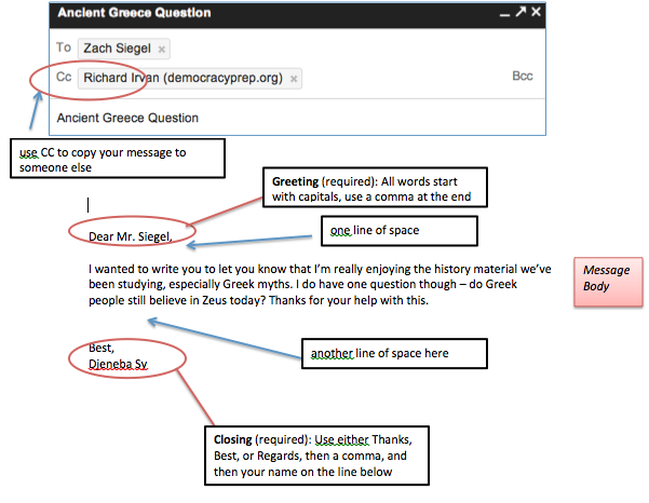
3. Screencast - Writing a professional email
4. Check for Understanding:
- What is the subject line for? Give an example.
- How do you start an email?
- How do you end an email?
- Why does style and formatting matter in professional email?
Sample Email
5. Independent Practice - Email a DREAM Team Member
Homework - Intro to Professional Email Handout (due Tuesday)
- Send a POSITIVE email to any adult in our building. You can tell them something you like learning in their class, ask a question, etc. Must be at least three sentences long.
- CC Mr. Irvan so you can be graded!
Homework - Intro to Professional Email Handout (due Tuesday)

| professional_email_day_1_hw_-_6th_grade.pdf |
